Your Amazon Listing Is Now the Script for an AI Audio Host: What Join the Chat Means for Amazon Sellers
 May 27, 2026
 Two things happened on Amazon's AI shopping stack in the past month, and the second one only makes sense if you understand the first. On April 28, 2026, Amazon launched Join the chat, a new interactive layer inside its Hear the highlights audio summary feature. Buyers can now interrupt an AI-generated audio conversation about a product, ask a question by voice or text, get a real-time answer pulled from the listing, reviews, and the public web, and then hear the hosts resume where they left off. Two weeks later, on May 13, Amazon retired the Rufus brand and folded its capabilities into a new unified product called Alexa for Shopping. As of today, Amazon's consumer-facing AI shopping stack has two surfaces: Alexa for Shopping, which handles text and voice answers and increasingly autonomous shopping actions, and Join the chat, which handles interactive audio. Both pull from the same source material. Your listing. Your reviews. The public web. Your listing isn't just a product page anymore. It's source material for every AI-mediated interpretation of your product, across every surface Amazon now operates.
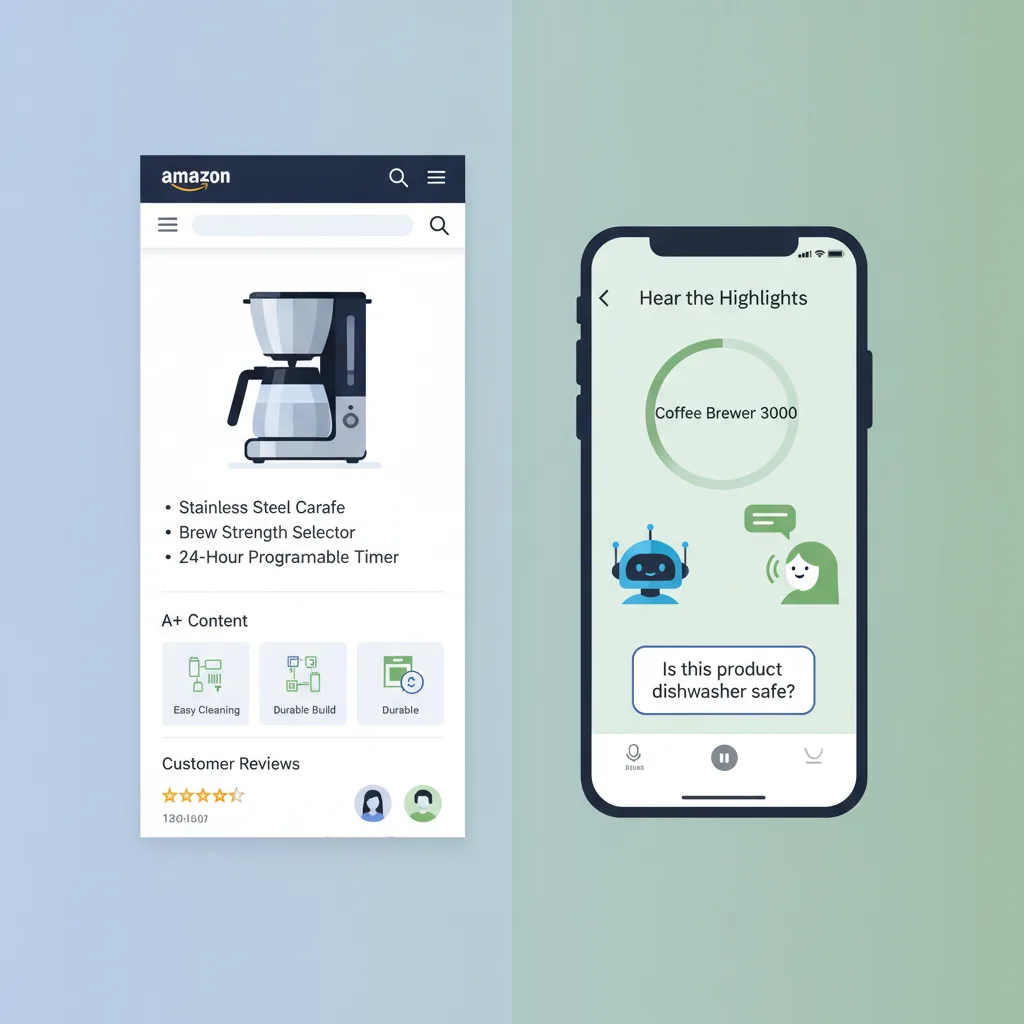
Quick answer: what is Join the chat and what does it mean for your listing?
Join the chat is Amazon's new interactive feature inside Hear the highlights that lets shoppers ask AI audio hosts questions by text or voice mid-summary, launched April 28, 2026. The AI pauses, generates a real-time answer drawing from product details, customer reviews, and public web content, then resumes the audio. The strategic implication for sellers: your listing copy and your review corpus are now training data for an AI host that buyers can interrupt. Combined with Alexa for Shopping (which absorbed the Rufus product on May 13, 2026 and now handles text, voice, and autonomous shopping actions across Amazon's surfaces), Amazon has consolidated and expanded its AI shopping interface in a single month. Listings with vague bullets, buried specifications, or thin Q&A coverage produce vague, buried, or incomplete audio answers, and the AI tells the buyer exactly what your listing failed to address.
Key Takeaways
-
Join the chat launched April 28, 2026 on iOS and Android in the US, layered into Hear the highlights inside the Amazon Shopping app.
-
Two weeks later, on May 13, 2026, Amazon retired the Rufus brand and merged its capabilities into a new unified product called Alexa for Shopping, which now handles text, voice, and autonomous shopping actions across Amazon.
-
Amazon's AI shopping stack now has two consumer-facing surfaces: Alexa for Shopping (text, voice, agentic) and Join the chat (interactive audio inside Hear the highlights). Both pull from the same source material.
-
The AI host pulls its real-time Join the chat answer from three sources: your product details, customer reviews, and information from across the public web.
-
Buyer questions captured here are data: every interrupt reveals what your listing fails to answer at the moment of consideration.
-
Listings competing on AI surfaces win on completeness and specificity, not on keyword density. Reviews are now a content channel that trains audio output.
-
Brands with vague descriptions, unstructured bullets, or thin specifications are most exposed because the audio answer inherits the gaps in the source material.
What is Amazon's "Join the chat" and how does it work?
Join the chat is an interactive upgrade to Hear the highlights, the AI-generated audio summary feature Amazon began testing in May 2025. Hear the highlights is now available to U.S. customers in the Amazon Shopping app on millions of products. The original feature gave buyers a short audio conversation between AI-generated hosts discussing the key features of a product on its detail page. The hosts pulled from product details, customer reviews, and publicly available web content to summarize the product.
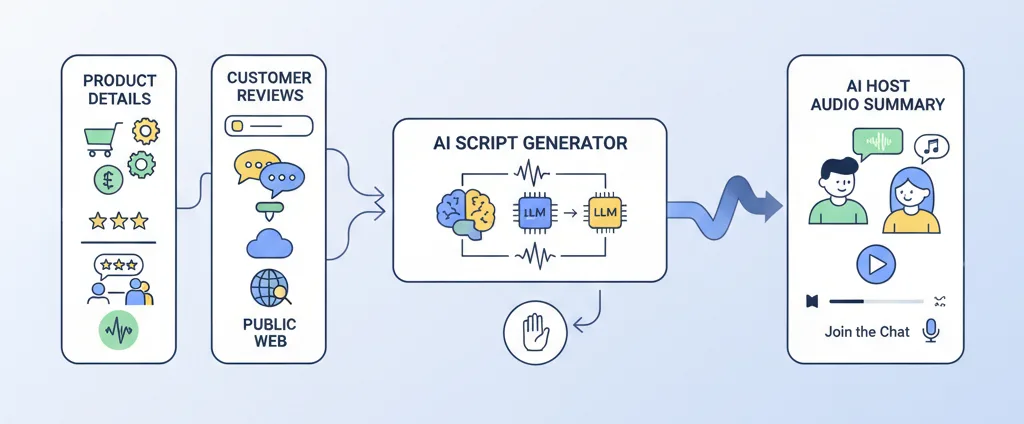
The April 28 launch added a layer on top. Inside any Hear the highlights audio summary, buyers can now tap a raised-hand icon and ask a question by typing or by voice. The AI script adapts in real time, the hosts pause, deliver a tailored answer using the same three sources, and then continue the conversation from where they left off. Example questions Amazon highlights in the launch announcement: "Is this coffee maker better for a beginner or someone with barista experience?" "Do people find this sweater itchy?" "Is this product dishwasher safe?"
The technical stack matters. Each Hear the highlights episode starts with an AI-generated script. When a shopper interrupts, the script adapts in real time using large language models, then advanced text-to-speech renders the new answer in the same voice and tone as the original episode. In the launch announcement, Amazon's VP of Conversational Shopping, Rajiv Mehta, positions the interrupt as participation rather than disruption: customers are not breaking the experience, they are inside it.
This matters because the underlying mechanism reveals what the AI is actually doing. It is reading your listing back to the buyer, and reading the reviews back, and reading whatever it pulls from the public web. Whatever is missing or vague in any of those inputs surfaces as a missing or vague audio answer.
How does Join the chat fit alongside Alexa for Shopping?
As of late April, Amazon had three separate AI products that touched buyer decisions on the product page: Rufus (text), Alexa+ (voice, general-purpose), and the audio summaries inside Hear the highlights. In the past month, that has been consolidated and extended at the same time. Rufus and Alexa+ have been merged into a single product called Alexa for Shopping (announced May 13, 2026 by Amazon VP of Conversational Shopping Rajiv Mehta, the same executive who announced Join the chat two weeks earlier). Alexa for Shopping now handles text answers, voice answers, and increasingly autonomous shopping actions across the Amazon Shopping app, amazon.com, and Echo devices. Join the chat, the interactive audio surface inside Hear the highlights, is the second surface.
Two surfaces. Different formats. Same source material.
|
Surface |
Formats |
Buyer interaction |
Primary source material |
|
Alexa for Shopping (launched May 13, 2026; replaced Rufus + Alexa+) |
Text in search bar, voice on device, autonomous shopping actions |
Typed or spoken question, threaded reply, price tracking, scheduled purchases |
Listing title, bullets, A+ content, description, back-end attributes, reviews, buyer purchase history, account preferences |
|
Join the chat (launched April 28, 2026 inside Hear the highlights) |
Interactive audio inside Amazon Shopping app |
Voice or text interrupt during audio summary, AI hosts pause and answer |
Listing details, customer reviews, public web |
Two things matter for sellers. First, the consolidation simplifies the strategic question. A month ago, the question was "how do I optimize for Rufus, Alexa+, and Hear the highlights as three different things." Today the question is "how do I optimize my listing as source material for an AI that reads it back as text, voice, agentic action, or interactive audio." The answer is the same answer, more concentrated.
Second, audio is a different rhetorical surface from text or voice answers in a search bar. A buyer reading a text answer can skim past a hedge or a generic phrase. A buyer listening to an audio host hedging or speaking generically hears it as the brand's actual voice: slow, conversational, and unavoidable. Vague listing copy compounds when the AI reads it back aloud, and Join the chat is the surface that exposes that gap most clearly because the buyer can interrupt and ask for the specifics the audio just glossed over.
What does Join the chat actually pull from your listing?
Amazon names three sources in the launch announcement: product details, customer reviews, and information from across the web. Each one carries different operator implications.
Product details
This is the full structured detail page: title, bullets, description, A+ content modules, technical specifications, dimensions, materials, ingredient or component lists, certifications, and back-end attribute fields. The AI script generator pulls from all of it. Brands that put their most important claims in the title and bullets (which is what classical Amazon SEO rewards) leave the AI without the supporting context it needs to deliver an interactive answer. The bullets give the AI the headline; the description, A+ content, and back-end fields give the AI the answer to follow-up questions.
Practical test: pick three products in your catalog. For each, write down five questions a buyer might ask in a Join the chat session. Then check your listing (title, bullets, A+ content, back-end attributes) for each answer. Gaps are exactly what the AI has to either guess, pull from reviews, or pull from the web.
Customer reviews
Reviews are doing double duty now. They were already social proof. They are now also a content channel that trains the AI's audio output. When a buyer asks "Do people find this sweater itchy?" (Amazon's own example from the launch), the AI is reading the review corpus, identifying the dominant signal, and verbalizing it. The brand has no edit control over that answer, but the brand does have edit control over what its product actually delivers, what its listing claims, and how it responds to negative reviews.
"We had a client in the pet supplement category where the listing said 'naturally calming.' The reviews kept clarifying, repeatedly, across multiple SKUs, that the product worked best for medium-sized dogs and showed effect within 30 to 45 minutes. We tested the listing in Rufus against a buyer query, and Rufus pulled the timing data from the reviews, not the listing. The brand had been monetizing the answer through reviews without ever updating the listing to claim it directly." Laura, Marketing Evolution Analyst
Information from across the web
This is the most variable input and the least controllable. Amazon's announcement language confirms the AI pulls from "publicly available information" beyond the listing and the reviews. For some products this is a defense: a recognized brand has a Wikipedia presence, review aggregators, third-party reviews, official spec sheets. For unrecognized brands, the AI is pulling from whatever the public web has, which can be incomplete or contradictory. Brands that have invested in off-Amazon presence (a real product page on their own domain, structured data, third-party press coverage) feed the AI better source material than brands operating only on Amazon.
What questions are buyers asking that your listing doesn't answer?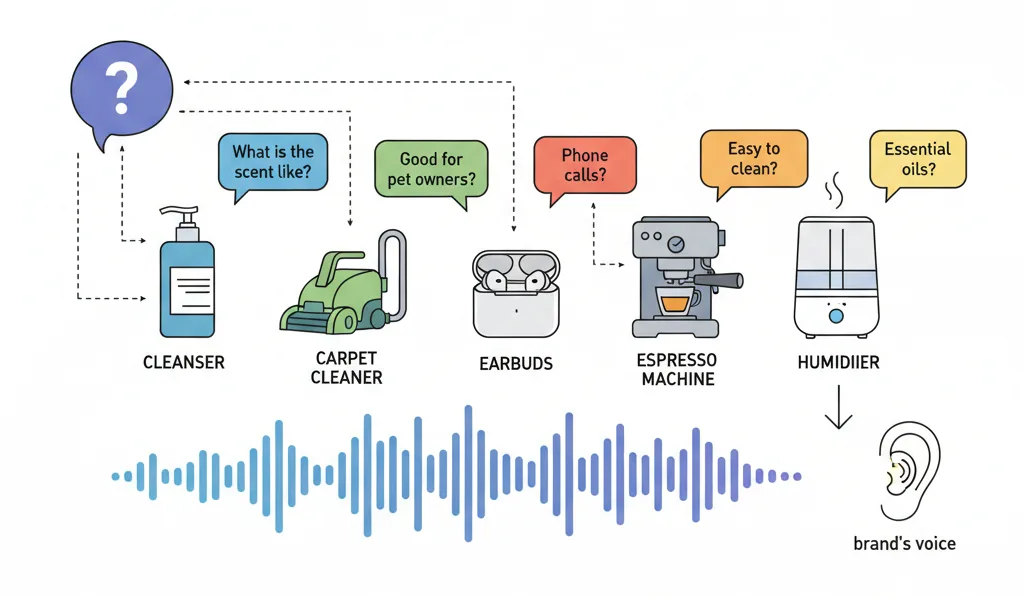
Amazon's launch announcement names five sample questions for five sample products. Reading the list reveals what kind of questions the system is designed for:
-
"What is the scent like?": La Roche-Posay Toleriane Purifying Foaming Facial Cleanser
-
"Is it good for pet owners?": BISSELL Little Green Mini Portable Carpet and Upholstery Deep Cleaner
-
"How do they work for phone calls?": Soundcore P30i by Anker Noise Cancelling Earbuds
-
"Is it easy to clean?": Ninja Luxe Café Premier 3-in-1 Espresso Machine
-
"Can it be used with essential oils?": Dreo Smart Humidifiers for Bedroom
Three patterns stand out. First, these are decision-stage questions, not discovery questions. The buyer has already found the product. They are now stress-testing whether it fits a specific use case. Second, the questions reveal use cases the listing did not write into the title or the first bullet ("good for pet owners," "easy to clean," "works with essential oils") but that buyers care about enough to interrupt the audio host to ask. Third, the questions are direct, conversational, and informal. Buyers do not ask "what are the cleaning specifications of this espresso machine." They ask "is it easy to clean."
Decision-stage questions tend to live in the same place across formats: the buyer wants confirmation on a specific use case, and the listing usually buries the answer or omits it entirely. Audio amplifies the cost of that omission because the AI answer becomes the brand's voice in the buyer's ear.
How should Amazon sellers optimize their listings for audio AI?
Five practical adjustments to the existing listing optimization playbook, ordered from highest leverage to lowest.
1. Audit your listings against decision-stage question patterns, not keyword density
Pull a list of the top 5 to 10 questions buyers actually ask about your product. Sources: your Amazon Q&A section, your customer service tickets, your review themes, competitor Q&A sections. For each question, check whether your listing (title, bullets, A+ content, back-end attributes) has a clear, declarative answer. If the answer is buried in reviews or absent entirely, move it into the listing copy.
2. Add a structured FAQ-style section to your A+ Content
The Standard Comparison Chart and Image with Text modules in A+ Content can host an FAQ-style structure even when Amazon's main listing fields can't. Use the modules to address the five highest-frequency questions about your product with clean, declarative answers. The same pattern we've recommended for AI image generation for Amazon listings applies here: write the visual asset and the surrounding text as if you were giving an AI host a citable source for a buyer's interrupt question.
3. Treat your review corpus as a content channel
Reviews train the AI audio. Two things follow. First, your brand response strategy on Amazon Q&A and on negative reviews is now content production. If a recurring objection in reviews has a real answer (a use case, a clarification, a product variant), answer it on the listing and consider whether the back-end attribute fields can carry the data. Second, requesting reviews is still important, but the quality of the review corpus matters more than the count. A review that explicitly addresses a specific use case feeds the AI a citable answer.
4. Verify your off-Amazon presence is consistent with your listing claims
The third Join the chat input source is the public web. For recognized brands, this is a defense layer. For everyone else, audit what the public web actually says about your product. Run the brand name plus product name in Google. Read the first 10 results. Anything inconsistent with your Amazon listing is fuel for an audio answer that contradicts your own marketing.
5. Stop measuring listing health by SEO metrics alone
Keyword rankings and search position still matter for traditional Amazon search. They do not predict citation success on Alexa for Shopping or Join the chat. The new evaluation question is whether your listing answers buyer questions clearly enough to be quoted aloud by an AI host. Build that into your listing audit cadence.
What are the limits of reading this announcement?
Three honest constraints on the analysis above.
Amazon's launch announcement is the only primary source on Join the chat. The trade press coverage (TechCrunch, eMarketer, PYMNTS, EcommerceBytes, Chain Store Age) summarizes the same announcement without adding independent operational data. There is no third-party study of how Join the chat performs across categories, how often buyers interrupt, what kinds of questions get asked most, or whether the audio answers convert better or worse than Alexa for Shopping text answers. The recommendations in this piece are based on the documented mechanics (what the AI pulls from, what questions Amazon shows it answering), not on outcome data.
The rollout is US-only and iOS plus Android only as of launch. Buyers on desktop, on web, outside the US, or using older app versions are not yet seeing this surface. Brands with predominantly international or desktop-dominant buyer behavior will see slower impact.
Amazon has not disclosed which products in the millions of Hear the highlights eligible products are getting the heaviest Join the chat usage. The five sample products in the launch announcement skew toward considered purchases (skincare, cleaning, audio, kitchen, home), which suggests the feature performs best where buyers are stress-testing a specific use case before committing. Commodity products with simpler decision criteria may see less interaction.
Action Checklist for Amazon Sellers
-
Pull a list of your top 5 best-selling SKUs and write down the top 5 to 10 questions buyers ask about each (from Amazon Q&A, customer service tickets, and review themes).
-
For each question, mark whether the listing has a clear declarative answer or whether the answer is buried in reviews or absent.
-
Update title, bullets, A+ content, and back-end attribute fields to surface the highest-frequency answers.
-
Add an FAQ-style A+ Content module on your top SKUs covering the 5 most-asked questions per product.
-
Run your brand name plus product name through Google and read the first 10 results. Flag anything inconsistent with your Amazon listing.
-
Set up a 90-day cadence to re-audit listing answer coverage as new buyer questions emerge.
-
Stop treating reviews as social proof only. Brief your customer service team that review responses are now content production for AI audio.
Your listing is no longer a product page. It's the script an AI host reads to a buyer who can interrupt it.
Frequently Asked Questions
Amazon launched Join the chat on April 28, 2026 to US customers on iOS and Android devices in the Amazon Shopping app. The feature is layered into Hear the highlights, which has been available on millions of product detail pages since broader rollout in 2026 following the initial May 2025 test.
Each Hear the highlights episode begins with an AI-generated script. When a shopper asks a question via voice or text, large language models adapt the script in real time to deliver a tailored answer using three sources: product details, customer reviews, and information from across the web. Advanced text-to-speech then renders the answer in the same voice as the original audio episode, and the hosts continue where they left off.
They are two separate AI surfaces Amazon operates on the product page. Alexa for Shopping, launched May 13, 2026, is the unified AI shopping assistant that absorbed the Rufus product and the Alexa+ assistant; it handles text answers in the search bar, voice answers on devices, and autonomous shopping actions like price tracking and scheduled purchases. Join the chat, launched April 28, 2026, is the interactive audio surface inside Hear the highlights, where buyers can interrupt an AI-generated audio summary with questions and get a real-time spoken answer. Both pull from the same source material (your listing, your reviews, and the public web), but the formats and buyer interaction patterns are different.
The same operator priorities that drive Alexa for Shopping and Join the chat citation success carry over. Audit your listing against the top 5 to 10 decision-stage questions buyers ask about your product. Surface answers clearly in titles, bullets, A+ Content, and back-end attribute fields. Treat reviews as a content channel that trains AI audio output. Verify the public web is consistent with your Amazon claims. Stop measuring listing health by keyword density alone.
Amazon has not released conversion or attribution data on Join the chat. The feature is new enough (launched April 28, 2026) that no third-party studies have measured outcomes. The directional risk is that audio AI answers that conflict with or under-deliver against listing claims may suppress conversion. The directional opportunity is that listings with strong question coverage may convert better when audio answers reinforce listing claims.
Amazon's launch examples skew toward considered purchases where buyers stress-test a specific use case: skincare, cleaning, audio equipment, kitchen appliances, home appliances. Commodity products with simpler decision criteria may see less Join the chat engagement. As of launch, Hear the highlights is available on millions of products but not every product.
Start with your top 3 to 5 best-selling SKUs. Pull the most-asked buyer questions from your Q&A section, customer service tickets, and review themes. Check whether your listing has a declarative answer for each question. Where the answer is buried in reviews or absent, move it into the listing copy. That single workflow addresses the largest share of citation gaps across both Alexa for Shopping and Join the chat simultaneously.
Ready to stop leaving money on the table?
Get a free margin audit and see exactly how much profit you're missing.
Book Your Free Audit →