Amazon Visual Search: What 8 AI Features Mean for Sellers (2026)
 Jun 10, 2026
 On June 3, 2026, Amazon shipped its largest visual search update yet: eight new and upgraded features in the Shopping app, headlined by AI-generated product images that take shape under the search bar as you type. The pictures are not real products. They are synthetic previews meant to guide shoppers toward visually similar items Amazon actually sells. For Amazon brands, the quieter story sits underneath the controversy. Amazon is moving the start of product discovery away from the keyword box and toward the image itself.
The short answer
Amazon's June 2026 visual search update adds AI-generated image previews, an upgraded Lens Live camera tool, Shop by Style collages, and Circle to Search, all built to let shoppers find products by sight rather than by typed keywords. For Amazon sellers, the practical shift is that your product photography now does double duty: it sells the product and it decides whether your listing gets matched to a shopper's visual query in the first place. Catalogs built only for keyword relevance are about to compete against catalogs built for visual matching.
Key takeaways
-
Amazon published a roundup of eight visual search features on June 3, 2026, several of which predate the announcement. The clearly new addition is AI-generated product images that render in real time under the search bar for apparel and home; Lens Live, Circle to Search, and the lock-screen Lens widget already existed.
-
The generated images are not real products. Tapping one runs a visual search for items Amazon sells that look similar, so your catalog images decide whether you get surfaced.
-
Lens Live, first launched in September 2025, now scans real-world objects through the camera and returns matches in a swipeable carousel, with Alexa for Shopping answering questions inside the camera view.
-
Visual matching runs on a deep learning embedding model that compares the shopper's view against billions of Amazon products. Your main image and supporting images are the input it reads.
-
Alexa for Shopping is the assistant Amazon renamed from Rufus on May 13, 2026. It now powers the question-and-answer layer inside Lens Live.
-
The operator move is to treat product imagery as a discovery asset: a clean main image, multiple angles, real-world context shots, and accurate attributes that survive a visual match.
What changed in Amazon's June 2026 visual search update?
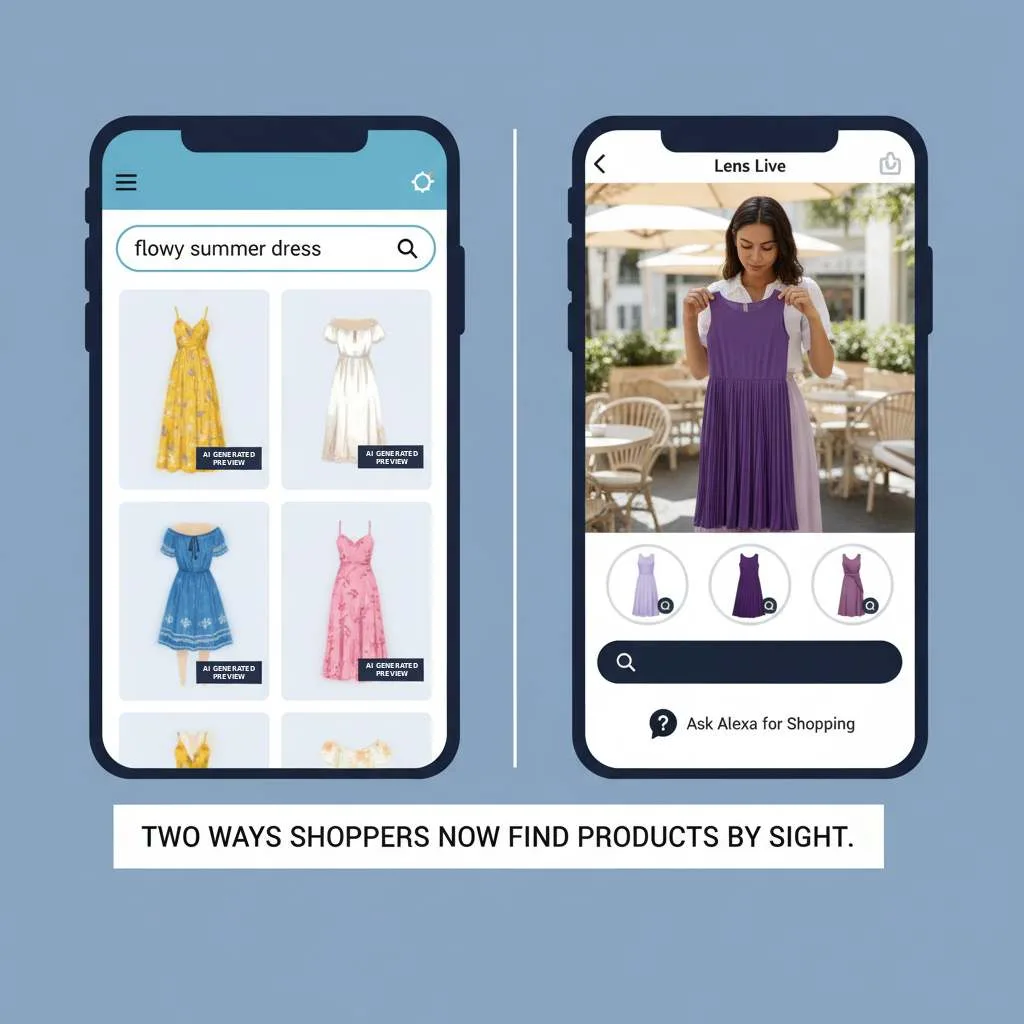
Amazon added or upgraded eight visual search features in the Shopping app on June 3, 2026. The headline addition is real-time AI-generated images that appear under the search bar as you type a description.
The update spans the full search journey, from a vague typed description to the moment a shopper refines results on a product grid. Amazon frames it as helping people who know what they want but cannot name it, citing examples like “cowl neck” for a draped collar or “rattan” for woven furniture. Several of the eight predate this release: Lens Live launched in September 2025, and Circle to Search, add-text-to-image search, and the lock-screen Lens widget already appear in Amazon's earlier Lens documentation. The clearly new addition is the AI-generated search images. Amazon presents the full set in its eight visual search features announcement.
|
Feature |
What it does |
Where it shows |
|---|---|---|
|
AI-generated search images |
Generates synthetic product images as you type a description; tap one to search for similar real items |
Under the search bar |
|
Shop by style |
AI-generated shoppable collages grouped by themes like “Urban luxe” |
Apparel search results |
|
Lens Live |
Real-time camera scanning with a swipeable match carousel and assistant Q&A |
Camera view |
|
Visual suggestions |
Image-based filters that narrow a broad query while you type |
Search autocomplete |
|
Add text to image |
Upload a photo and add text like “like this, but in white” |
Amazon Lens |
|
Lens lock-screen widget |
Launches Lens camera search from the iOS lock screen |
iPhone lock screen |
|
More like this |
Surfaces visually similar products from a result you like |
Search results grid |
|
Circle to search |
Circle an item in an uploaded image to search just that object |
Amazon Lens |
Adoption is not hypothetical. Amazon reports that tens of millions of customers already use Amazon Lens each month, and that photo searches have more than doubled over the past year. Visual discovery is becoming a primary entry point, not a novelty.
Why is Amazon showing AI-generated images when you search?
Amazon's stated goal is to close the gap between what a shopper pictures and what they can put into words. As a shopper describes color, texture, or pattern, AI-generated images take shape in the suggestions and refine with each word added.
Tap the image that matches the vision and Amazon runs a visual search for similar real products. The feature is live in apparel and home, where visual detail matters most, with more categories planned. The reception has been skeptical. TechCrunch called it potentially misleading, noting that shoppers who do not read carefully may expect to find the exact pictured item, then be disappointed when it does not exist. The operator read is narrower: the generated image becomes the query, and your catalog photo is what gets matched against it.
How does Amazon Lens Live work, and what is different now?
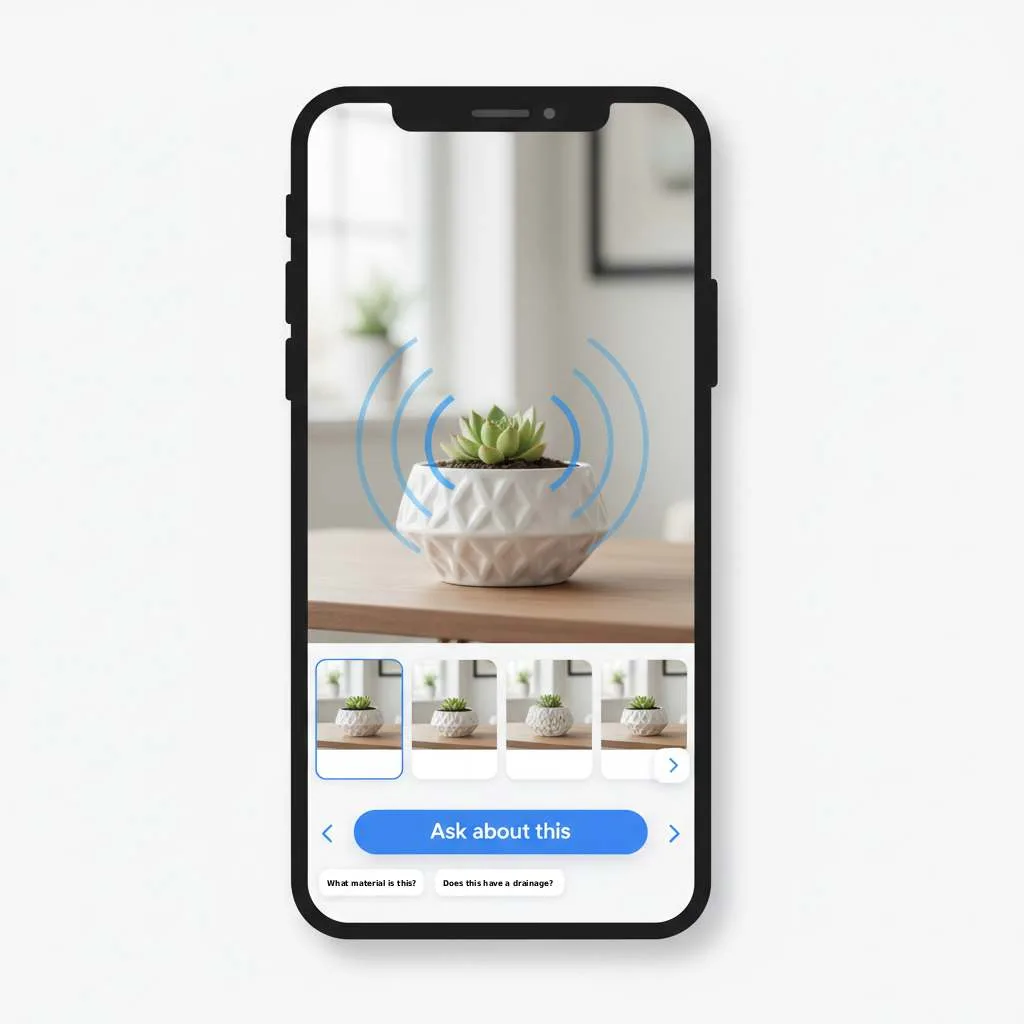
Lens Live turns your camera into a live product scanner. Point it at an object and Amazon surfaces matching items in a swipeable carousel at the bottom of the screen, where a shopper can compare, add to cart, or save to a wish list without leaving the camera.
Lens Live first launched in September 2025. The current version adds deeper assistant integration. Lens Live now embeds Alexa for Shopping, Amazon’s agentic shopping assistant (the assistant Amazon renamed from Rufus on May 13, 2026), inside the camera view with product summaries, suggested questions, and an “Ask about this” button for questions like how to remove a stain from a rug. When the camera cannot identify an object, Amazon generates a caption describing what is visible so the shopper still has a starting point.
What does visual search change about your Amazon product images?
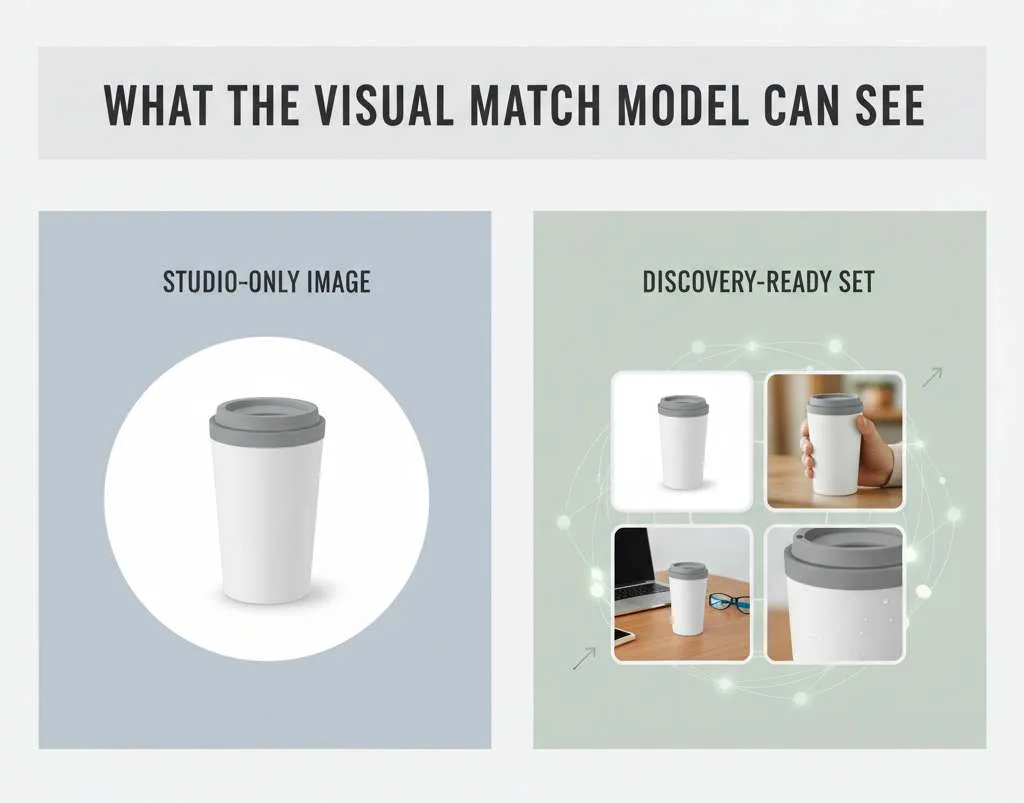
It turns your images into a discovery surface, not only a conversion element. In a visual search, the shopper never types your keywords. Amazon matches a picture against your catalog photos before any text comes into play.
Amazon describes Lens Live using a deep learning visual embedding model to match the customer's view against billions of products and retrieve exact or similar items. That means your main image, secondary images, and the visual attributes they show (shape, color, material, styling) are the input the match runs on. A travel mug shot on a plain white background reads as one thing to that model. The same mug shown in a hand, on a desk, beside a laptop gives the model more to match against real-world camera scenes. Listings with thin or studio-only imagery compete at a disadvantage.
How do AI shopping assistants read your listing during a visual search?
Once the image match surfaces your product, a second layer takes over: the assistant. Alexa for Shopping reads your listing text to answer the questions a shopper asks inside the camera or carousel view.
Amazon says Lens Live uses the assistant's language model to offer relevant questions and answers, though it does not spell out which listing fields feed them. The operator read: the assistant pulls from what it can read on your page, including your title, bullets, A+ content, and customer reviews, plus information from across the web. Ask whether a sofa fits through a 30-inch doorway and you get an answer only if that dimension lives somewhere readable.
The two layers run in sequence: your images win the match, your words win the question. A listing strong on one and weak on the other loses half the funnel.
|
Layer |
What Amazon reads |
What to optimize |
|---|---|---|
|
Discovery (visual match) |
Main and secondary images, via a visual embedding model |
Clean main image, multiple angles, real-world context shots, visible attributes |
|
Answer (assistant Q&A) |
Title, bullets, A+ content, reviews, and web sources, via the language model |
Dimensions, compatibility, use cases, and common questions written into readable copy |
Action checklist: getting your catalog ready for visual search
-
Test your main image against a visual match, not a thumbnail. Open Lens Live, scan a competitor's product in your category, and check whether your item appears in the carousel.
-
Add real-world context shots. Show the product in use, in a hand, in a room, so the embedding model has scene-level detail to match against camera scans.
-
Cover the visual attributes shoppers describe. If buyers search “rattan,” “cowl neck,” or “matte black,” make sure those attributes are visible in your images, not only stated in text.
-
Fill the structured attribute fields in your listing. Color, material, dimensions, and style feed both visual filters and assistant answers.
-
Put answerable facts in readable copy. Dimensions, compatibility, and use cases belong in the title, bullets, or A+ content where Alexa for Shopping can retrieve them.
-
Read your reviews for the questions they answer. The assistant pulls from reviews, so recurring questions are a map of what to address.
-
Re-shoot thin catalogs first. Products with a single studio image on white are the most exposed to visual-match competition.
Your main image used to win the click. Now it has to win the match before anyone clicks at all.
Frequently Asked Questions
Lens Live is Amazon's real-time visual search feature in the Shopping app. It scans whatever your camera points at and shows matching products in a swipeable carousel, with Alexa for Shopping answering questions inside the camera view. It first launched in September 2025 and was upgraded in the June 2026 visual search update.
No. The images Amazon generates under the search bar are synthetic previews, not items in the catalog. Tapping one runs a visual search for real products that look similar. The feature is live in apparel and home categories, with more planned.
No. Amazon renamed Rufus to Alexa for Shopping on May 13, 2026. The assistant integrated into Lens Live and the rest of the Shopping app is now Alexa for Shopping, though some older Amazon pages still reference the Rufus name.
Visual search matches a shopper's image against your catalog photos before any keyword is typed. Your main and secondary images decide whether your product surfaces, and your listing text decides whether the assistant can answer follow-up questions. Imagery becomes a discovery input, not only a conversion element.
A clean main image plus multiple angles and real-world context shots. Show the product in use and in a setting so Amazon's visual matching model has scene-level detail to compare against camera scans, not just a studio cutout on white.
No. Keyword relevance still drives typed search and the assistant's text answers. Visual search adds a parallel discovery path that runs on images. The two work together: optimize text for the words shoppers type and the questions they ask, and optimize images for the products they point their camera at.
Ready to stop leaving money on the table?
Get a free margin audit and see exactly how much profit you're missing.
Book Your Free Audit →